
Contents
- Module features
- Before setup
- Connect and configure the module
- Create and send a payment link
- Payment status updates
- Cancel a payment link
- Add another connection
- Limitations
Wompi is a payment service for accepting online payments. The module integrates Wompi with Simla and lets you create payment links directly in an order.
You can send the generated link to the customer by email, SMS, or any other convenient communication channel. After payment, Wompi notifies the module about transaction changes, and the module automatically updates the payment status in Simla.
The module works with Wompi Colombia and Wompi Panamá:
- Wompi Colombia connections use COP;
- Wompi Panamá connections use USD.
The payment currency in Simla must match the country selected for the Wompi connection.
Module features
The module provides the following features:
- connection to Wompi Colombia or Wompi Panamá;
- support for the Sandbox test environment and the Production environment;
- creation of a single-use link to a secure Wompi payment page from a Simla order;
- creation of a link for a fixed amount in the currency of the selected connection;
- automatic receipt of Wompi transaction status changes;
- automatic payment status updates in Simla;
- cancellation of an active unpaid link;
- multiple independent Wompi connections in one CRM account.
Before setup
Before connecting the module, prepare the following:
- a Wompi Colombia or Wompi Panamá merchant account;
- Sandbox credentials for testing or Production credentials for accepting real payments: Public Key, Private Key, Events Secret, and Integrity Secret.
The keys and secrets are available in the Wompi account under Desarrollo → Programadores.
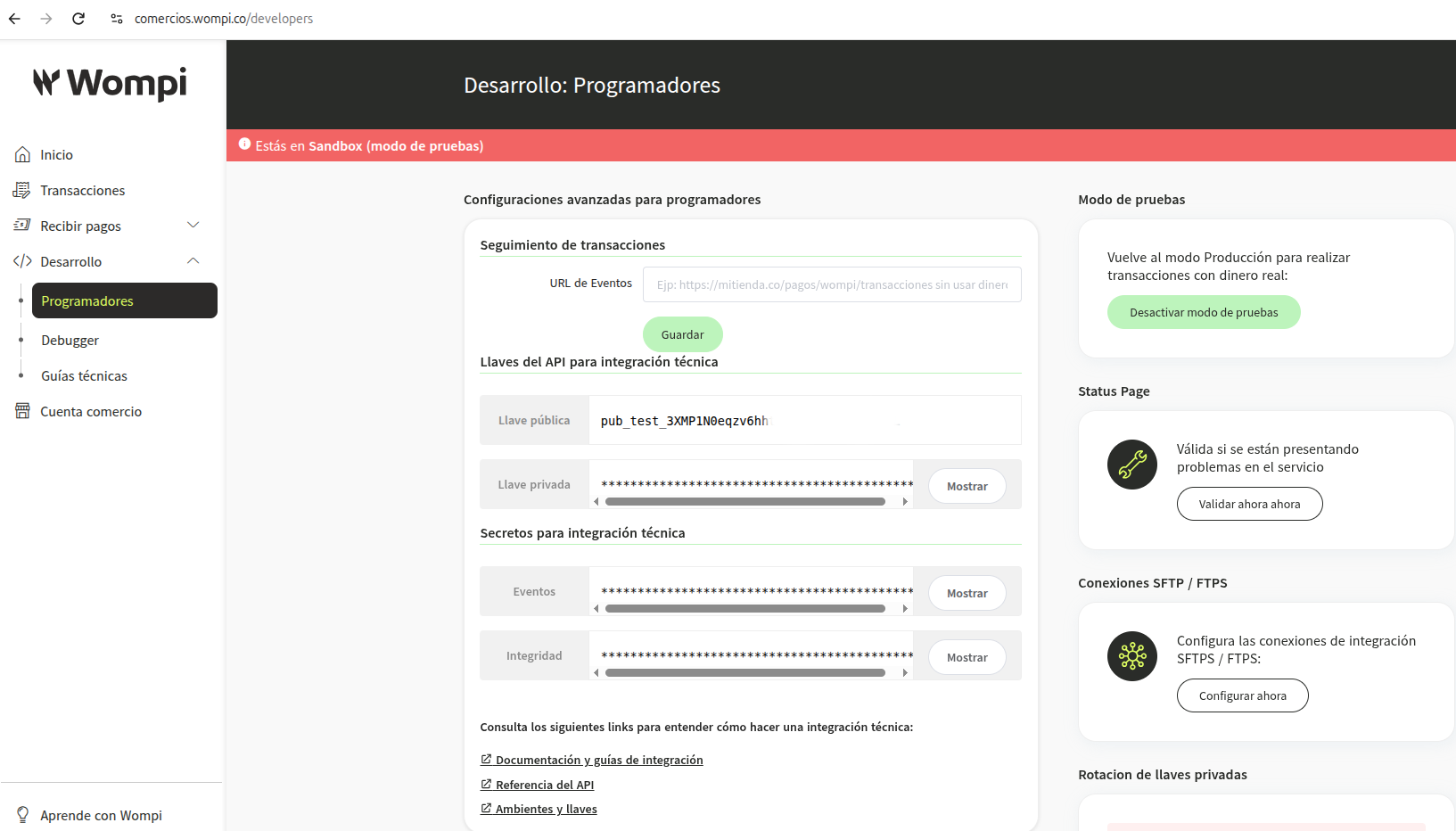
Sandbox credentials use the following prefixes:
pub_test_— Public Key;prv_test_— Private Key;test_events_— Events Secret;test_integrity_— Integrity Secret.
Production credentials use the following prefixes:
pub_prod_— Public Key;prv_prod_— Private Key;prod_events_— Events Secret;prod_integrity_— Integrity Secret.
Do not mix Sandbox and Production credentials in the same connection. Do not share the Private Key, Events Secret, or Integrity Secret with third parties.
Note
To work in Production, the Wompi merchant account must be activated and have working Production credentials.
Connect and configure the module
- Install Wompi from the Marketplace and click Connect.
- Confirm the module connection to your CRM account. The required
integration_readandintegration_writepermissions are requested automatically; you do not need to create a separate CRM API key. - Open Settings → Integration → Wompi Module.
- Select the connection country: Colombia (COP) or Panama (USD).
- Enable Sandbox test mode if you use test credentials. To accept real payments, leave test mode disabled and use Production credentials.
- Enter the Public Key, Private Key, Events Secret, and Integrity Secret for the selected environment.
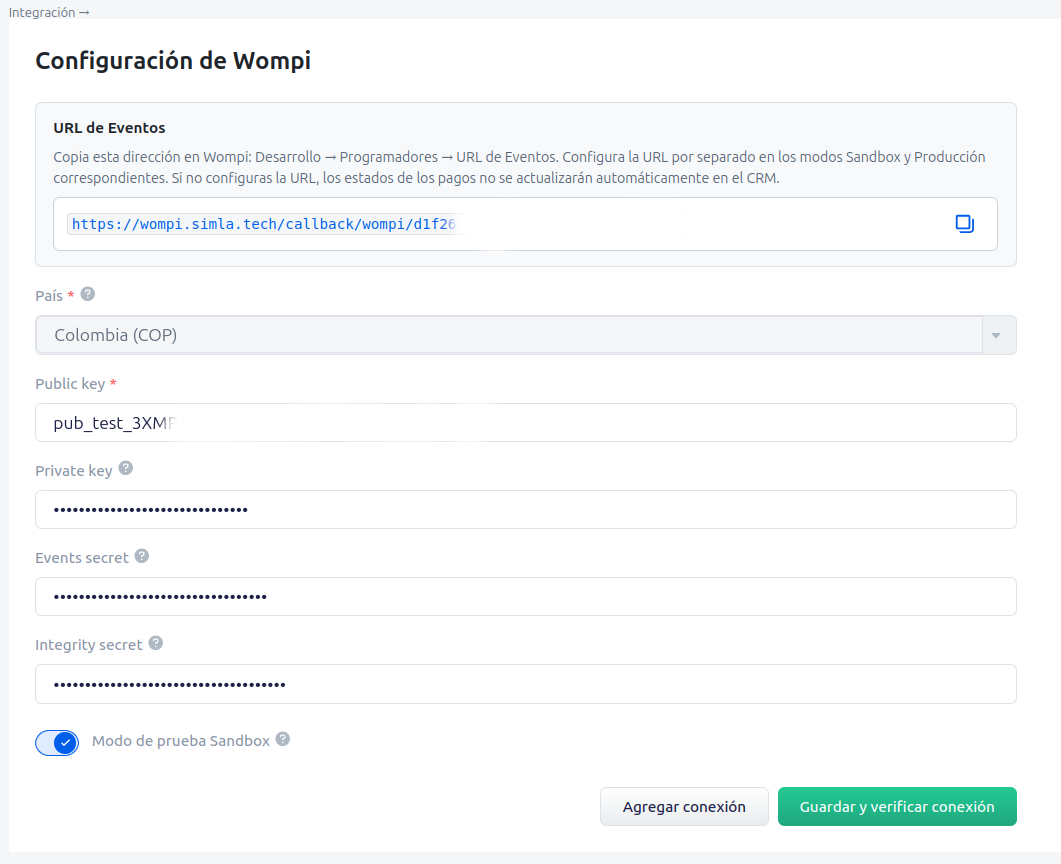
- Click Save and check connection. The module checks whether the credentials match the selected environment, verifies the merchant account by its Public Key, and registers the payment integration in Simla.
- Copy the URL de Eventos shown in the settings.
- In the Wompi account, open Desarrollo → Programadores, paste the address into the URL de Eventos field for the selected environment, and save the settings.
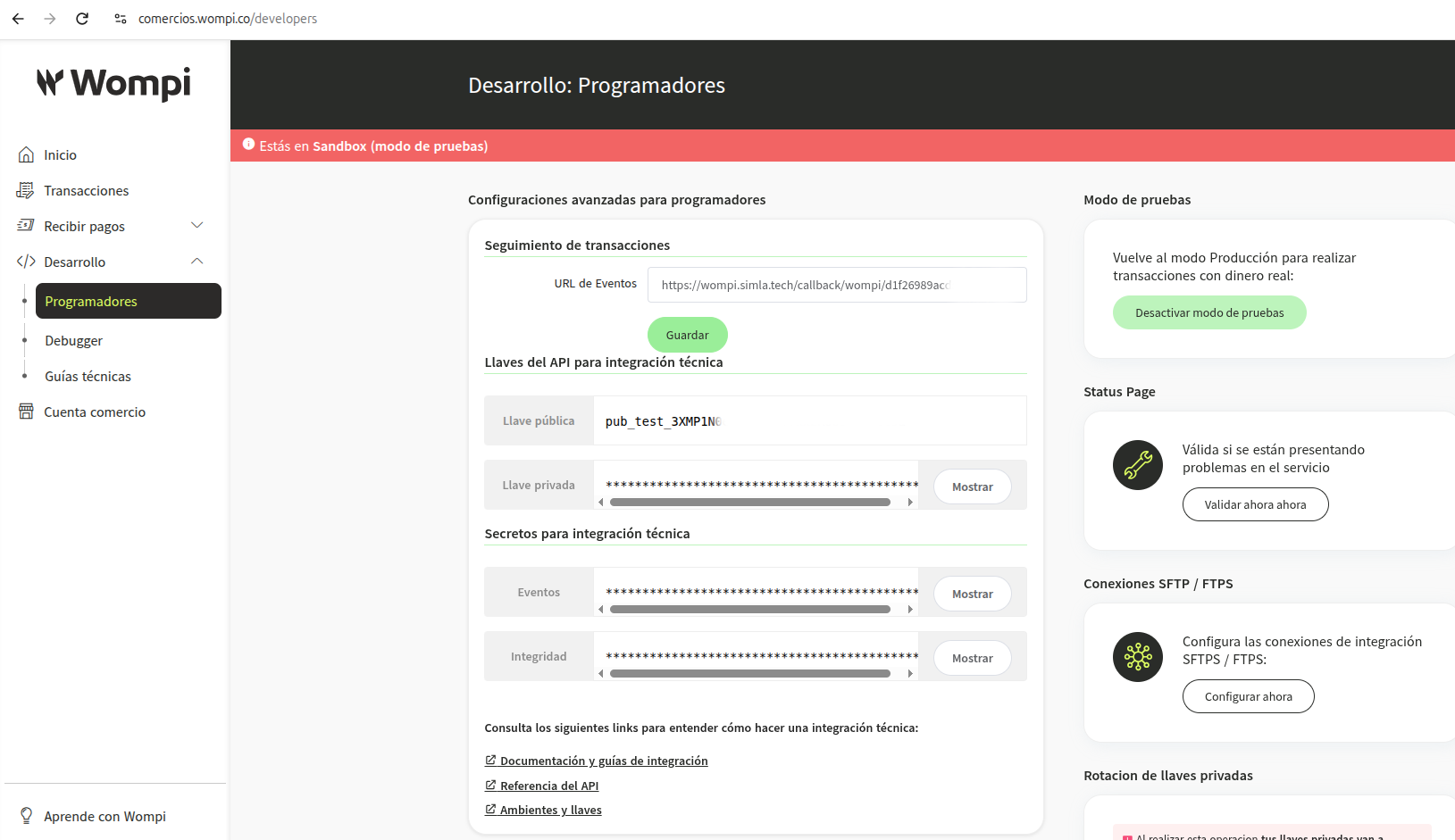
The connection country and environment cannot be changed after the settings are saved. To use another country or switch between Sandbox and Production, create a separate connection.
Important!
The URL de Eventos is configured separately for Sandbox and Production in the Wompi account. Without this address, the module will not receive transaction change notifications, and payment statuses will not be updated automatically in Simla.
Create and send a payment link
- Create or open an order in Simla and save it.
- In the Payments block, add a payment with the Wompi payment type.
- Check the payment amount and currency. Colombia uses COP, while Panamá uses USD.
- Click Generate link.
- Copy the generated link and send it to the customer by email, SMS, chat, or another convenient channel.
When the customer opens the link, the module checks whether it is available for payment and only then redirects the customer to Wompi's secure payment page.
The link is created for the amount specified in the invoice, is single-use, and is valid for 24 hours by default. The customer cannot change the amount or make a partial payment.
Note
Simla cannot create an invoice link until the order has been saved. Save the order first, and then generate the link again.
Payment status updates
The customer follows the link and completes the payment on the Wompi side. When the transaction status changes, Wompi sends a notification to the URL de Eventos.
The module verifies the notification's authenticity, amount, currency, and payment identifier, saves the new state, and sends the result to Simla.
The main outcomes are processed as follows:
- a successful Wompi transaction changes the Simla payment status to paid;
- an incomplete transaction remains pending payment.
After a successful payment, the link cannot be used again.
Cancel a payment link
You can cancel an active link while the payment is pending:
- Open the payment in the order.
- Click Cancel.
- Confirm the invoice cancellation.
The module immediately blocks the link and asks Wompi to disable the corresponding payment link. After it is successfully canceled, the customer can no longer start payment using that link.
Canceling a link does not refund a payment. You cannot cancel an invoice that has already been paid this way.
Add another connection
The module supports multiple independent Wompi connections in one CRM account. For example, you can use separate connections for different merchant accounts, countries, or Sandbox and Production environments.
- Open the settings of the existing Wompi module.
- Click Add connection.
- Open the new connection.
- Select the country and environment.
- Enter a separate set of Public Key, Private Key, Events Secret, and Integrity Secret credentials.
- Save the settings and add the displayed URL de Eventos to the corresponding Wompi account and environment.
Each connection has its own settings, credentials, URL de Eventos, and module menu item in Simla.
Limitations
- The module supports payment links only.
- Wompi Colombia supports COP, and Wompi Panamá supports USD. The module does not convert currencies.
- Partial invoice payments are not supported: a link is created for a fixed amount.
- You cannot change the country or environment after configuring the connection. Create a new connection for another country or environment.
- You can cancel only an active unpaid link. Canceling the link does not cancel or refund a completed transaction.
- The module does not support manual payment confirmation or delayed capture.
- The module does not support refunds from Simla. Refunds are handled according to Wompi's rules and the procedures available for the selected payment method.
- The payment methods available to the customer depend on the country, environment, and Wompi merchant account settings.
- To update payment statuses automatically, configure the URL de Eventos in the Wompi account.