
Configuring Daemon Collector for a site on OpenCart To interact with visitors on your site, you can configure a specialised system service - Daemon Collector. false W3sidGl0bGUiOiJJbnRlZ3JhdGlvbiIsInVybCI6Ii91c2Vycy9pbnRlZ3JhdGlvbi8ifSx7InRpdGxlIjoiTW9kdWxlcyBmb3IgaW50ZWdyYXRpb24gd2l0aCBhIHNpdGUiLCJ1cmwiOiIvdXNlcnMvaW50ZWdyYXRpb24vc2l0ZS1tb2R1bGVzLyJ9LHsidGl0bGUiOiJPcGVuQ2FydCIsInVybCI6Ii91c2Vycy9pbnRlZ3JhdGlvbi9zaXRlLW1vZHVsZXMvb3Blbi1jYXJ0LyJ9XQ== Integration /users/integration/ ["users","Integration"] ["users","Integration","Modules for integration with a site"] users

Configuring Daemon Collector for a site on OpenCart

To interact with visitors on your site, you can configure a specialised system service - Daemon Collector.

To configure Collector, you need to activate the site key in the system.

This key is specified in the module settings. Select “Yes” in the “Use Daemon Collector” option and specify the site key activated in the system. This allows you to see which of your customers are currently on the site.
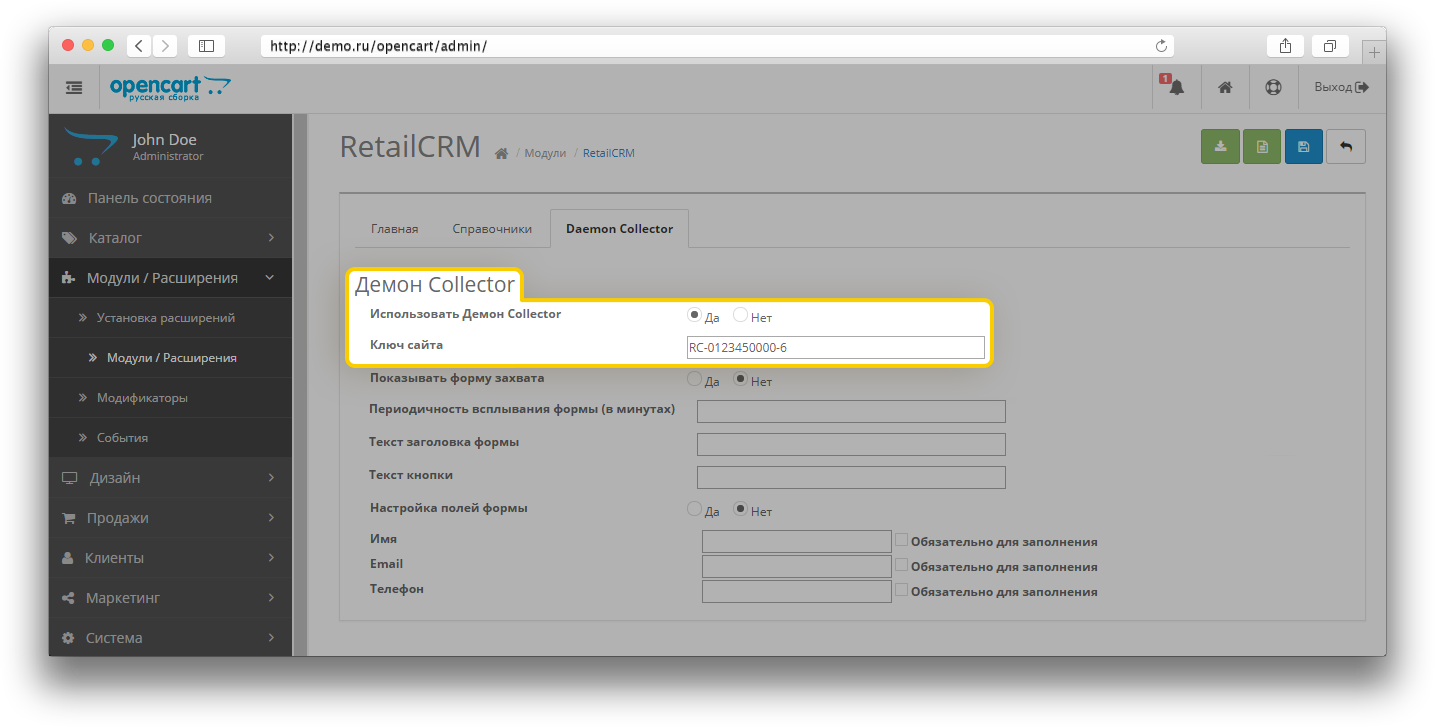
Activate the “Show capture form” option so that the form for sending applications is available to site visitors.

You can also configure the form itself. The frequency of the pop-up form (specified in minutes) allows you to configure the period after which the form will be shown to the visitor. You can specify your own text for the form header and add a button to send messages (if you do not specify any text, the default text will be displayed).

To configure the form fields, specify the names of the fields that will be displayed in the form (empty fields will not be displayed).

You can tick the required fields.

Note

At least one field is required.
Thank you for your feedback.
Was this article helpful?
No
  • The recommendations did not help
  • There is no answer to my question
  • The text is difficult to understand
  • I do not like the described functionality
Yes
Previous article
Installing the module in OpenCart
You can integrate the online store on OpenCart with RetailCRM using the module located on opencart.com. In this article, we will consider the different stages of installing and configuring the module.
Next article
Working with corporate customers in OpenCart
This article explains how to activate the transfer of corporate customers from OpenCart to RetailCRM and vice versa.