
Making calls to customers To make an outgoing call from the customer/order card, simply click on the “handset” (telephone) icon. Integration with a telephony system must first be set-up via the Marketplace. Information on calls is recorded in the "History of calls". false W3sidGl0bGUiOiJTYWxlcyIsInVybCI6Ii91c2Vycy9vcGVyYXRpbmctYWN0aXZpdHkvIn0seyJ0aXRsZSI6IkN1c3RvbWVycyIsInVybCI6Ii91c2Vycy9vcGVyYXRpbmctYWN0aXZpdHkvY2xpZW50cy8ifSx7InRpdGxlIjoiV29ya2luZyB3aXRoIHRlbGVwaG9ueSIsInVybCI6Ii91c2Vycy9vcGVyYXRpbmctYWN0aXZpdHkvY2xpZW50cy90ZWxlcGhvbnkxLyJ9XQ== Sales /users/operating-activity/ ["users","Sales"] ["users","Sales","Customers"] users

Making calls to customers

To make an outgoing call from the customer/order card, simply click on the “handset” (telephone) icon. Integration with a telephony system must first be set-up via the Marketplace. Information on calls is recorded in the "History of calls".

Calls from the order and customer cards are made in the same way.
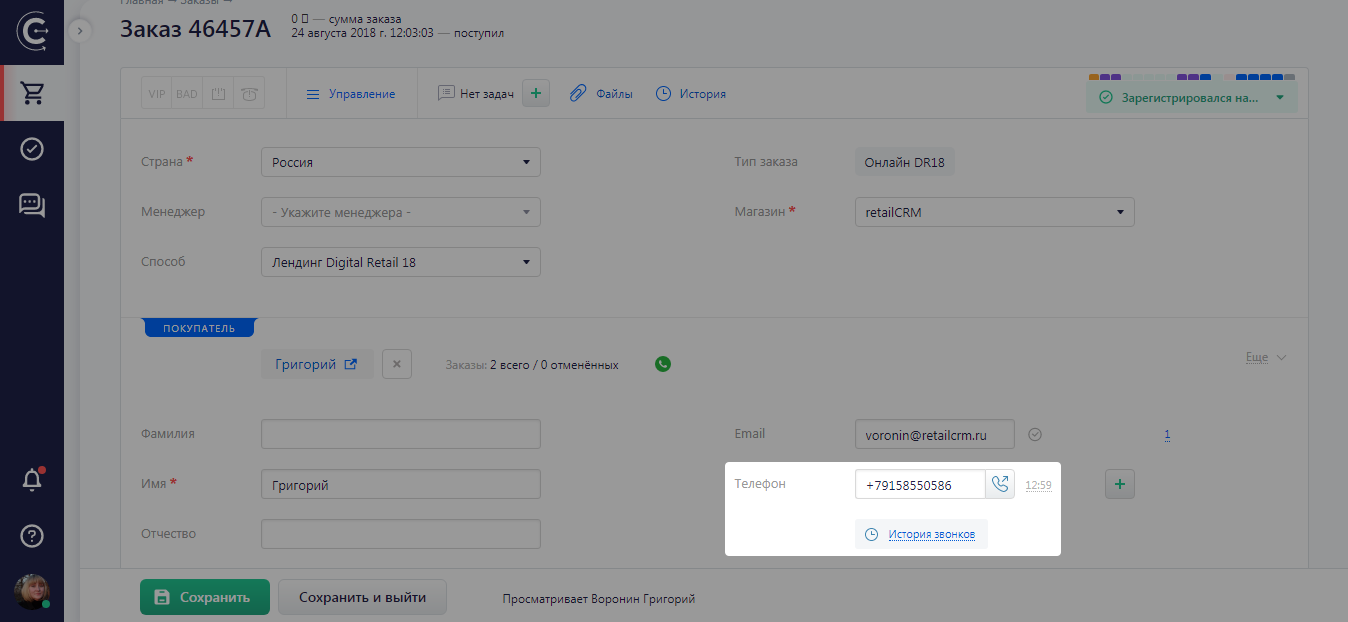
Example (Order card): To the right of the phone number, the handset (telephone) icon and the customer’s time zone are displayed.

To initiate a phone call, you need to click on the “handset” icon.

Note

You can only make calls from within the system if you have set up an integrated telephony system.

You can view call history in the order card via the “History of calls” link located directly under the phone number.

Thank you for your feedback.
Was this article helpful?
No
  • The recommendations did not help
  • There is no answer to my question
  • The text is difficult to understand
  • I do not like the described functionality
Yes
Next article
Processing incoming and missed calls
When you receive a call, a notification with information about the caller will appear. From this notification, you can make a call or create a call-related task.