
Contents
- Chat, dialog, and channel
- How the agent "hears" the chat
- Events the agent reacts to
- Dialog owner: who is currently handling the conversation
- When the agent starts
- What happens on key events
- How to cancel the agent's automatic start
- Starting the agent when the dialog is not on the bot
- Manager command to start the agent
- Loop protection
- Choosing the agent for an event
The agent does not work on its own. It reacts to what happens in the chat with the client: to a new message, to a dialog being assigned, to a dialog being closed. This section describes what a chat is made of, which events arise in it, and how they lead to the agent starting. Understanding this layer explains why in some situations the agent replies to the client and in others it stays out of the way.
Chat, dialog, and channel
Before talking about events, it is important to distinguish three concepts that the chat system works with.
A channel is the source of the conversation: WhatsApp, Telegram, the website's online consultant, Instagram, and others. An agent is configured to work on specific channels, and it is by the channel that the system decides which agent should handle the conversation.
A chat is the conversation with a specific client on a specific channel. The same person who wrote to you on WhatsApp and on Telegram is represented in the system as two different chats.
A dialog is an individual enquiry within a chat. A dialog has a status (open or closed) and an owner — whoever is currently handling the conversation: a manager or the bot. Over its history, a single chat can contain many dialogs: the client got in touch, the question was resolved, the dialog was closed; later the client wrote again — a new dialog opened.
Within the service, these concepts correspond to "Client" and "Conversation" from the Core concepts and terms section. In short: each of the client's chats on a channel is a separate "client" in the system, and the whole history of communication with them that the agent sees is stored in their active "conversation". The agent always works with a single active conversation.
How the agent "hears" the chat
The agent's work in the chat is carried out through a bot connected to the chats via the MG Bot API over a permanent connection (WebSocket). Through this connection, the bot receives a stream of events about everything that happens in the account's chats.
The service reacts not to the whole stream, but only to a limited set of events that genuinely affect the agent's work: new messages in the chat, and the assignment and closing of dialogs. Everything else is ignored.
The external format of the events is described in the MG Bot API documentation.
Events the agent reacts to
The most frequent event is a "new message" in the chat. But messages come in different kinds, so the system first works out who the message is from and what type it is, and only then decides what to do with it. This way a single technical event turns into one of several meaningful ones:
| Event | What it is | How it affects the agent |
|---|---|---|
| Message from customer | The client wrote in the chat (text, photo, file, voice) | By default, starts the agent if the dialog is assigned to the bot. This is the main way to start the agent in the chat |
| Message from manager | Messages from the manager in the chat | The agent usually does not reply, but the message is saved in the history so that it takes it into account as part of the conversation. You can configure a separate step for this event for background actions |
| Command from manager | A service command message (for example, /agent) |
The only way to start the agent manually by the manager, or to return work to it to continue with the scenario |
| Message from another bot | Another bot wrote in the chat | The agent does not reply to it; for now such a message only updates the reminder timers |
| Dialog assignment | The dialog was transferred to a new owner | By default, if the dialog was assigned to the bot, the agent gets to work |
| Dialog closing | The dialog has ended | The agent clears the conversation context; steps configured for this event may fire |
| Delayed action | Internal run of a step by a timer after a set time | Brings the agent back to work after a set time. This is not a chat event but an internal mechanism of the service |
The bot's own messages, under which the agent runs, are filtered out immediately — the agent does not react to what it sent itself.
Dialog owner: who is currently handling the conversation
This is the key idea of the whole section. Every dialog has an owner at any given moment, and whether the agent can reply to the client depends on it. There are three possible states:
- dialog on the bot — the owner is our bot; the agent is allowed to reply to the client;
- dialog on a manager — the owner is an employee (or another bot); the agent does not intervene in the conversation;
- dialog on no one — no owner is assigned.
This is a security barrier. While a manager is handling the dialog, the agent will not write to the client, even though it receives all of their messages. The agent replies only when the dialog belongs to the bot. Even so, it can still perform background tasks (for example, analysing the conversation and assigning tags) — but those are separate actions, not replies to the client.
This is the default behaviour, and it can be configured: a scenario is allowed to start the agent even on someone else's dialog — for background work or to take the dialog over (see Starting the agent when the dialog is not on the bot).
If an event arrives in the chat while the agent is already working on this same thread, the new start interrupts the previous one. This way the system does not allow a single agent to handle the same conversation twice in parallel.
When the agent starts
Starting the agent is not an automatic reaction to any event. By default, only two events start the agent, and only if the dialog is assigned to the bot:
- assignment of the dialog to the bot — this is the typical "initial" start, when the distribution rules or a manager hand the dialog over to the agent;
- a message from the client — the client wrote and is waiting for a reply.
All other events do not start the agent on their own. If you need the agent to engage on such an event — for example, on a message from the manager or on a delayed action — you configure steps triggered by events for that. Unlike ordinary steps, which the agent itself works with, such steps are started by the system when the corresponding event occurs.
There is an important difference here between the two kinds of steps. A step that the agent works with can, after running, by default hand work back to the agent. An event-triggered step, on the other hand, does not wake the agent by itself: it merely performs the actions defined in it and finishes. For the agent to actually engage on an event — for example, to write to the client — you need to explicitly add the "Call AI agent" action inside such a step (or "Go to another step" with a transition to a step managed by the agent).
All steps are triggered by events except those the agent chooses itself: reaction to a signal, steps on a message from the client or the manager, on the assignment and closing of the dialog, on a delayed action. What matters is not which actions are configured inside such a step, but which of them actually ran, taking conditions and availability into account.
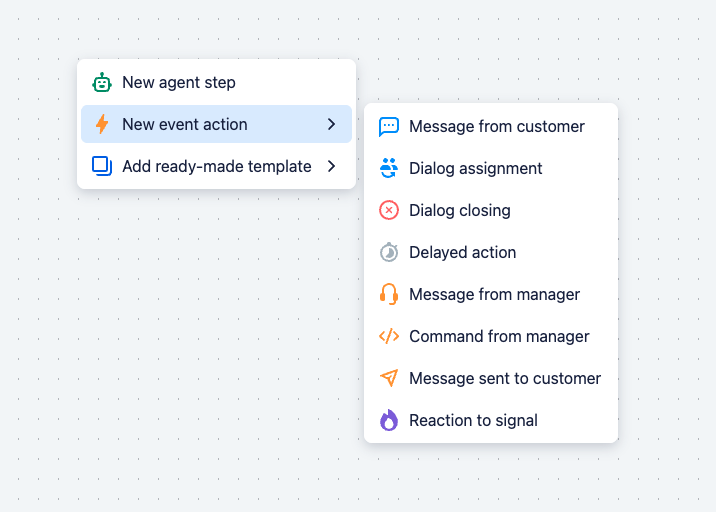
This separation is built into the very creation of a step: in the scenario editor, there are different buttons for the two kinds of steps — one adds a step that the agent works with, the other adds a step triggered by an event.
What happens on key events
Message from the client. The message is saved in the thread history. Any reminders about waiting for a reply that were scheduled earlier are cancelled — the client replied, there is no need to remind them anymore. If the dialog is on the bot, the agent is started.
Dialog assignment. If the dialog was assigned to the bot, the agent takes over the conversation and starts working: usually this is where the client is greeted and the scenario is entered. If the dialog was assigned to someone else (for example, to a manager), the agent, on the contrary, stops and no longer intervenes in the conversation. And if the assignment happened because of the agent's own action according to the scenario, the event is ignored so as not to start the work again (see Loop protection).
Dialog closing. By default, the agent resets the scenario context accumulated during the dialog — signals, dashboard tasks, step visibility — so that the same client's next enquiry starts with a clean slate. This behaviour is configurable, and exactly what is reset and what survives the closing is covered in detail in the What accumulates in the context and when it is reset section. In addition, you can configure your own step triggered by this closing event.
Message from the manager. The agent does not reply by default. The employee's message is saved in the thread history as a message from the assistant — the same as the agent's own replies. This is done on purpose: for the agent, the manager's messages and its own are indistinguishable and are perceived as messages from one and the same side. This way the agent sees what has already been said to the client, takes the manager's words into account as part of the common reply, and does not duplicate them. If necessary, you can configure a step triggered by this event on a message from the manager, for background actions.
Delayed action. An internal run of a specific scenario step by a timer after a set time. The mechanism is described in detail in the Delayed actions section.
How to cancel the agent's automatic start
The automatic start of the agent on a message from the client and on the assignment of the dialog is the default behaviour, and it can be overridden. This is needed when, on an event, a fixed set of actions must run without starting the agent.
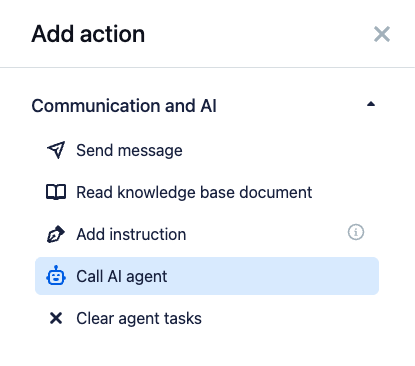
The mechanism relies on the processing order: steps configured for a message from the client or for the assignment of the dialog are processed by the system before the default agent start fires. The automatic start itself is, in essence, a fallback route: it kicks in only if no such step took control. And this takeover relies on the property of event steps already described: such a step does not wake the agent by itself. So if you attach a step to a "starting" event (a message from the client or the assignment of the dialog) that runs but does not invoke the "Call AI agent" action, the automatic start of the agent on that event is cancelled: that step takes control and simply does its job.
The "Call AI agent" action itself is available only in event-triggered steps. It is not present in steps that the agent works with — there it is not needed: such a step can by default continue the agent's work anyway.
An important caveat: the step must actually run. If its conditions do not match at the moment and the step is filtered out, the system considers that there was no takeover, and the normal automatic start of the agent fires.
To completely disable the automatic start of the agent on a channel, you need two such steps:
- a step on the message-from-client event — without the "Call AI agent" action;
- a step on the dialog-assignment event — without the "Call AI agent" action.
Together they take control of both events that would otherwise start the agent.
What this is for. This way you can build useful behaviour in the chat without starting the agent even once — which means at no cost: billing is charged for the agent's work, while running a simple set of actions in event-triggered steps is free.
A typical example is handling non-working hours with a separate agent. Such an agent is configured to work only outside working hours and should not handle the dialog itself. Instead of starting the agent on a message from the client, it:
- sends the client a short note that it is currently outside working hours;
- sets a delayed action for the start of working hours — but already for another agent, configured for working hours.
When working hours begin, the delayed action starts the working-hours agent, and it continues the conversation with the client. All of the out-of-hours interaction thus takes place without starting the agent and at no cost. The actions themselves can be anything — the point is that they are performed by a fixed set of steps, without involving the agent.
Starting the agent when the dialog is not on the bot
The rule "the agent replies only when the dialog is on the bot" is the default behaviour, but it can be deliberately overridden. The "Call AI agent" action has a start mode setting that determines what happens if, at the moment the step fires, the dialog is handled not by the bot but by a manager or another bot.
There are three modes, from passive to active:
- Assigned owner (default). The agent works only when it is the owner of the dialog. If the dialog is handled by a manager or another bot, the agent is not started — the step simply does not wake it. The step's other actions still run anyway (update the state, remove reminders, assign a tag). This preserves the previous behaviour: on someone else's dialog, the agent stays silent.
- Background work. The agent is started even if it is not the owner of the dialog. It cannot take the dialog over — the owner remains a manager or another bot — but it can write to the client and perform actions. This is suitable for preparation: classifying the enquiry, assigning tags, finding materials in the knowledge base, updating the state. The agent performs only one run: subsequent events will not wake it by themselves until they are handled by a step with a forced agent call.
- Dialog takeover. The agent takes the dialog over (reassigns it to the bot) and then works as usual — including replying to the client. This is an action visible to the manager and a business-level decision: it is used for an explicit takeover — escalation on a trigger, handing the dialog over to the bot when the manager is unavailable, or a section of the scenario that must be handled specifically by the agent. If the dialog could not be taken over, the agent is not started and the step is marked as failed.
The mode is chosen right in the "Call AI agent" action, so within a single step you can combine different modes through conditions — for example, taking the dialog over when there is an unresolved complaint, and limiting yourself to background analysis in all other cases.
Manager command to start the agent
The manager can connect the agent to the conversation manually, right from the chat, with the service command /agent. It is sent as a private message and is not visible to the client.
This is an important capability, because right now you cannot manually assign a dialog to an agent through the system interface. The /agent command is the only way for the manager to hand a specific dialog over to the bot: it assigns the dialog to the agent configured for that chat's channel and starts it. This is handy when the manager wants the agent to pick up a conversation that a person was handling before. If the dialog was on the manager at that moment, the bot first assigns it to itself and then starts.
The command has two modes:
- Just hand the dialog over to the agent —
/agentwith no parameters. The agent takes over the conversation and decides for itself what to do next, based on the conversation and the available scenario steps. - Hand the dialog over and immediately give a task —
/agent StepName, optionally with an additional instruction:/agent StepName instruction text. Then the agent starts straight from running the specified scenario step, and the instruction is added as a clarification to the task. The target step must be configured for the "Command from manager" event. The exact step name for the command can be copied from that step's card in the interface.
Loop protection
Some of the agent's actions change the dialog itself. If a scenario step assigns the dialog to someone or closes it (via the corresponding dialog-closing action), the external system will send the bot an event about that change — an assignment or a closing. Without protection, this would lead to a loop: the agent's action generates an event, the event starts the agent again, and so on in a circle.
To prevent this, the service marks the changes caused by the agent's own actions and recognises the events that arrive because of them. An assignment of the dialog made by the agent itself is simply skipped. With closing it is subtler: the service performs the context cleanup in the usual way — a self-initiated closing does not cancel it — but the steps configured for dialog closing are not triggered on such a closing.
Choosing the agent for an event
When an event is ready to be processed, the service selects the agent that should handle it. The selection logic is simple:
- the channel the conversation came from is determined;
- among the account's running agents, the one configured for that channel is found;
- the CRM's current working hours and the agent's working mode are checked (always, only during working hours, or only outside them);
- the first suitable agent is taken.
If the dialog is assigned to the bot but there is no suitable agent right now (for example, no one is configured for this time), the service removes the bot from the dialog so that the conversation does not get "stuck" without an owner and a manager can pick it up.