
Contents
- Two types of schedules
- What a schedule consists of
- Why custom schedules are needed
- Where schedules are used
A schedule defines what time is considered "working" for one or another of the agent's tasks. Initially, the agent has the standard working hours from the CRM settings, but you can add your own schedules to them for different tasks — and then rely on them in the agent settings, in scenario conditions, and when launching delayed actions.
Two types of schedules
- CRM working hours — the account's general schedule. It determines whether it is currently a working hour or not, and the agent's "working / non-working hours" mode runs by it.
- The agent's custom schedules — separate time windows that you create yourself for specific tasks. Each has its own name, and each can be referenced independently.
What a schedule consists of
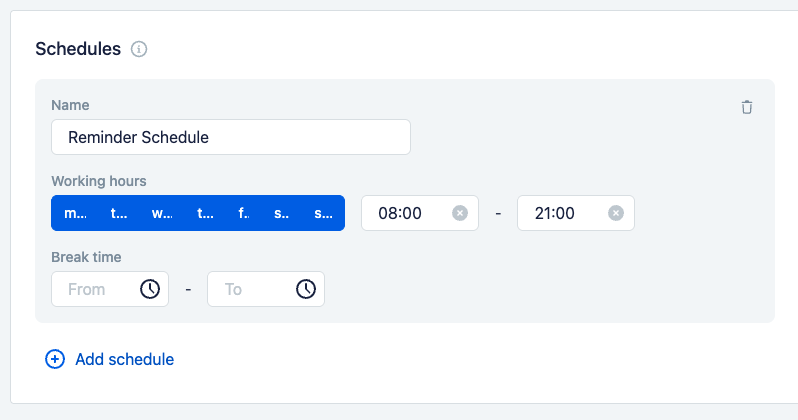
Schedules are configured in the "Schedules" block on the agent settings page. Each schedule is defined like this:
- Name — the schedule name by which you reference it in conditions and other settings (for example,
Promo,Shift A). - Time zone — the zone in which the schedule's time is interpreted. This matters when agents for different regions work in one system: each has its own local time.
- Working hours — for each day of the week (Mon–Sun), an interval is set when the schedule is active, for example 08:00–21:00. The days on which the schedule does not apply can be turned off.
- Break time — an optional interval within the day (From / To) when the schedule is considered inactive, for example a lunch break.
There can be several schedules — the "Add schedule" button creates another one. This way different windows are set up for different tasks.
Why custom schedules are needed
The standard working hours are not enough for everything. Your own schedules let you describe any time windows important for the agent's work. For example:
- A promotion period — so that the agent offers promotional terms only during the needed period.
- A particular group of managers' shift — to behave differently or distribute dialogs differently depending on who is currently on shift.
- A window for sending delayed actions — so that reminders and the continuation of the conversation go to the client only at an acceptable time and do not arrive at night or on weekends.
Where schedules are used
A schedule does nothing on its own — it becomes useful when other mechanisms rely on it:
- The agent's working mode (in the settings) — working or non-working hours are determined by the schedule.
- Scenario conditions — a condition can check whether the current moment falls within the needed schedule and, depending on that, open a step, skip an action, or lead the scenario in a certain direction. For details, see the Conditions section.
- Delayed actions — the launch of a delayed action can be limited by a schedule, so that the message goes to the client only within the allowed window. For details, see the Delayed actions section.