
Contents
- What to store and what not to
- A document — the unit of the knowledge base
- How a document becomes available to the agent
- How the agent uses the base
- Automatic link updating
- Training the base from unanswered questions
- What is important to keep in mind
The knowledge base is reference information that the agent retrieves on demand during a conversation: prices, delivery and payment terms, service descriptions, regulations, answers to frequent questions. Unlike instructions, which the agent keeps in front of it at all times, knowledge base materials are pulled in only when they are genuinely needed for an answer.
This is convenient for information that there is no point keeping in the prompt on every message: it can be voluminous, change often, or relate to narrow questions that do not arise in every dialog. The agent is instructed to check the knowledge base for factual client questions, because its general knowledge may be outdated or wrong for a specific business — while the knowledge base and instructions are considered verified sources.
What to store and what not to
Reference material fits well into the knowledge base:
- frequent questions and their answers;
- delivery, payment, and return terms;
- product and service descriptions, price lists;
- regulations and descriptions of procedures;
- links and files that may be updated.
But some things are not worth keeping in the knowledge base — there are more suitable mechanisms for them:
- the agent's role and positioning, critical security rules — the agent always needs these, so their place is in the main prompt, not in a base that is pulled in on demand;
- scenario logic that must perform actions in the system — that is the job of scenario steps;
- conditions and automatic reactions to the state of the conversation — these are signals and conditions.
A document — the unit of the knowledge base
The whole base consists of documents. Documents belong to the account and are linked to agents: one document can be connected to several agents at once, and a single agent can be given access to the needed set of documents. This way shared material (for example, a product FAQ) is created once and reused by different agents — support, sales, consultation.
Documents come in four types:
- Text — ordinary text material added in the system.
- Link — an external address (URL) where a document to download is located (not a website): the system downloads this document by the link and extracts the text from it.
- File — an uploaded file (for example, PDF or DOCX); the system extracts the text from it.
- Question-answer — a special type that is created automatically when the base is trained from clients' unanswered questions (see below).
Despite the different types, any document ultimately turns into ordinary text — it is by the text that the agent searches for an answer to the client's question. A text document stores this text directly. A link and a file are essentially the same thing: a source from which the system downloads the document and, after special processing, extracts the text from it. It is the extracted text that becomes what the agent sees. So after processing a file or a link, it is useful to check exactly what text was extracted: in case of recognition errors, it can be corrected and refined manually. In addition, link documents can update automatically on a schedule — this is handy when you need to pull in changing data from the internet (more details below).
Documents can be arranged into sections — these are folders for organisation, including nested ones. Sections are optional, but they help bring order to a large base, and the agent sees which section the found material came from.
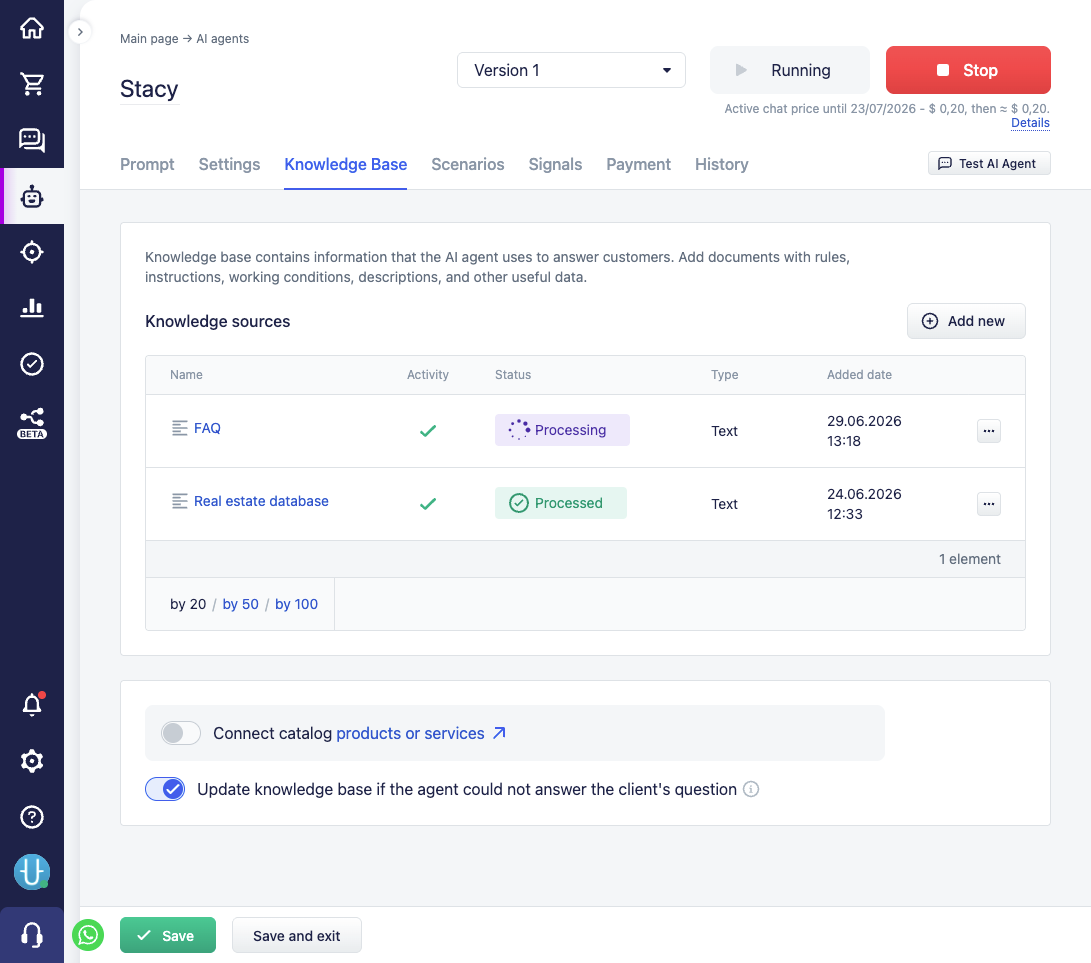
How a document becomes available to the agent
A document is not used by the agent right after it is created — first the system processes it: parses the contents (and for links and files, downloads the source first), prepares it for semantic search, and automatically writes a brief description of the document.
A document has a status that shows which stage it is at:
- Processing — the system is preparing the document, it is not yet available to the agent;
- Processed — processing is finished, the document is available to the agent for search and use;
- Moderation — the starting status for new questions received from clients in the chat; the document is waiting for the user's involvement (see below) and is unavailable to the agent;
- Error — processing failed (for example, the link is unavailable); unavailable to the agent.
The agent sees a document only in the "Processed" status, only if the document is linked to this agent and not disabled.
The document description is generated automatically — it is a short one-to-two-sentence summary of what the document is about. It does not replace the contents but helps the agent find the document faster and gauge its relevance without reading the whole text.
If a document's contents change, the system automatically reprocesses it.
How the agent uses the base
Working with the base is arranged in two levels. At the first, the agent is told that the knowledge base is available and how to use it — this is part of its instructions (see the Instructions section, the knowledge base slot). At the second, the agent performs a search through a special step, and the system finds the suitable documents and returns them to the agent.
The search itself works in one of two modes — depending on the size of the base:
- A small base (roughly up to a couple of dozen documents). The agent immediately sees the full list of available documents with their names and descriptions and chooses the needed ones. This is fast and does not require a separate search.
- A large base. The agent searches by meaning: it formulates a query in its own words, and the system selects the documents most suitable by meaning (not by exact word match). Then the agent requests the full text of the needed documents.
In the second mode, the system evaluates how close each found document is to the query and discards the clearly irrelevant ones. So the quality of the search largely depends on how clearly the documents themselves and their descriptions are written.
Automatic link updating
Link documents can be configured for periodic updating. For such a document, an interval is set, and after the set time the system downloads the document by the link again and, if the contents have changed, reindexes it. If the contents have not changed, no extra work is done.
This is handy for documents that are regularly updated at a constant address: for example, a price list or a regulation that is exported to the same place. It is enough to add a link document with an update interval once, and the agent will always work with the current version.
Training the base from unanswered questions
The knowledge base can be filled in automatically — the "Update knowledge base if the agent could not answer the client's question" setting is responsible for this (see the Agent settings section).
When it is enabled and the agent does not find an answer to the client's question, it saves this question as a question-answer document in the Moderation status. Such a document is not yet available to the agent — it has the question but not yet an answer.
So that the base does not get cluttered with repeats, the system checks the new question for similarity to those already saved. If a similar question already exists, the new wording is either appended to the existing document or discarded as a duplicate, rather than creating another record.
Next the user steps in: they review the questions in moderation and add an answer to them. After saving, the document goes through processing and becomes available to the agent — now the agent will answer such a question itself. This is a convenient way to gradually find gaps in the base from real enquiries and close them.
What is important to keep in mind
- A document is available to the agent only in the "Processed" status, linked to this agent and not disabled. Disabling a document (without deleting it) temporarily removes it from access — this is handy for hiding material without losing it.
- Creating and changing documents requires processing (parsing the contents, preparing for search, generating the description), so a document becomes available not instantly but after the processing is finished.
- The quality of the agent's answers directly depends on how the documents are written: clear text and accurate descriptions help the agent find the right material and apply it correctly.