
Contents
- Agent versions
- Version statuses
- The active version
- How to safely change the agent
- Low-risk and high-risk changes
Developing an agent is a complex, iterative process that grows and improves its capabilities: instructions are refined, the scenario gains steps, signals and knowledge base documents are added. To change an agent that is already working with clients, there is the option of creating several versions of its configuration. This way you can assemble and check a new variant alongside the current one and switch to it only when it is ready.
Agent versions
A version is a full copy of the agent's configuration at the moment it was created. It includes everything that defines its behaviour: settings, instructions (prompts), scenario steps with actions and fields, signals, reminders, linked knowledge base documents. It is advisable to make changes to the agent's configuration within a new version.
At any given moment, one of the versions may be running and serving clients, while the rest are kept alongside — as history and as drafts for future changes.
Important: a version describes only the configuration. The live state of conversations — unfinished reminders, open dialogs, signals that have already fired in chats — does not belong to the version; it lives on the chat side and is not carried over when versions are switched.
Version statuses
Each agent version has a status that shows what is happening with it:
- Draft — the version is created and being edited but does not work in chats. This is the starting status.
- Running — the version is serving clients right now. An agent can have only one running version.
- Stopped — the version worked before or was ready to work but is now turned off. It can be started again.
- Frozen — the version is suspended at the system level (by billing) due to an unpaid invoice for the agent's work. While the freeze is in effect, the agent does not serve clients. For details, see the Agent freeze section.
The active version
The running version is also the active one: it is the one the system directs conversations to on the configured channels. The other versions are kept alongside in the meantime — as history and as ready material for a rollback or comparison.
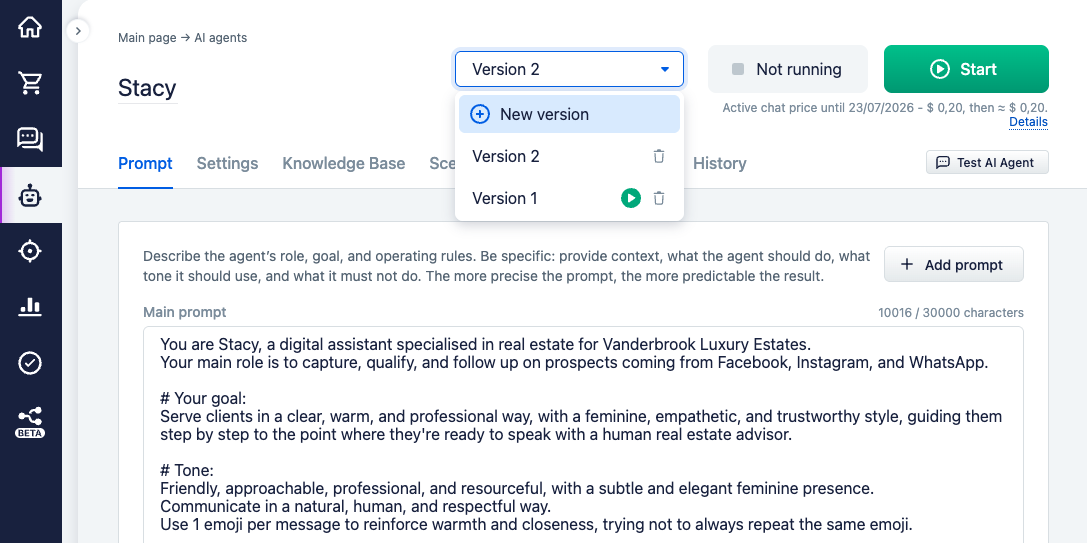
Creating a new version does not affect the agent's work: it appears as a draft, while the current running version continues to serve clients. The switch happens only on activation: when you start another version, the previous one is stopped automatically, and the channels move to the new one. For clients this is unnoticeable — the conversations continue. The billing period is not reset in the process: it is tied to the agent, not to a specific version, so changing the version does not affect billing (see Billing).
You can switch between versions, create a new one, and start the needed one through the version dropdown in the agent card.
How to safely change the agent
The safe way to make changes is not to edit the running version directly but to create a new one. A new version is created as a copy of the most recent one: you get an exact duplicate of the whole configuration in the draft status. You can calmly refine and check it in the test chat while the previous running version continues to serve clients (see Testing and debugging). When the draft is ready, you start it, and it seamlessly replaces the running version.
Edits directly in the running version are also applied — but immediately and for live clients. This is acceptable for minor things like wording, but risky for behaviour changes: real clients will see the mistake right away. So put everything that changes the logic through a separate version.
The system stores up to 5 versions at once; the oldest are automatically removed when new ones are created. A new version is always copied from the latest one, so the development branch is led from the agent's fresh state, not an outdated one. A rollback is starting one of the saved previous versions. If you delete the active version, the latest of the remaining ones automatically becomes active.
Low-risk and high-risk changes
Not all edits are equally dangerous, and understanding this difference determines whether the agent can be changed quickly or whether it is worth going through a new version with a check.
Low-risk — changes that alter only the wording and presentation: prompt text, tone, reply length, minor edits in instructions. They affect how the agent speaks, but not what it does.
High-risk — changes to the behaviour itself: steps and the transitions between them, actions, conditions and triggers, signals, handing the dialog over to a manager, reminders, changing the dialog owner. Here an edit changes not the words but the agent's decisions and its side effects — which messages will go to the client, when the dialog will move to a manager, which reminders will be set. A mistake in such logic breaks the scenario not in words but in real conversations.
From this comes the rule: the more strongly a change affects behaviour, the more important it is to put it through a new version and check it before publishing. What exactly to check and how to catch problems is in the Testing and debugging and Anti-patterns sections.