
Contents
- What you pay for: the active chat
- The active chat cost depends on the agent's complexity
- The trial period
- Dynamic cost from the second period
- Billing period
- What is not billed
- Where to view billing
- Agent freeze
- Frequently asked questions
- Why is the cost determined dynamically?
- Roughly how much will an agent cost?
- Can the agent be refined after the trial period, and how does it affect the cost?
- If the same client writes on different channels, will I have to pay for them twice?
- If only event-triggered steps work in the scenario and the agent itself does not start, do I pay for such chats?
- What happens to billing if I stop the agent for a while?
- How are charges for active chats made — once or gradually?
- Do I pay for chats where the agent made a mistake?
Payment in the service works as follows: you pay for active chats, not for the number of messages or individual enquiries. An active chat is the agent's conversation with a client on a single channel over 30 days. How much one active chat costs depends on how complex the agent is configured to be: a simple agent is cheaper, a complex one more expensive.
The first work period is a trial one: an active chat costs a fixed, low amount while the system measures the agent's real consumption. After that, the cost is calculated dynamically and reflects the actual work of your specific agent.
What you pay for: the active chat
The billing unit is the active chat: the agent's conversation with a client on a single channel over a period. Several important things follow from this:
- You pay for the chat, not for the volume of communication. No matter how many messages the client sends or how many dialogs there are in this chat over the period — it is counted once.
- Only for chats where the agent actually worked. If the agent did not touch the client (for example, a manager handled the dialog the whole time and the agent did not start), no active chat arises and there is no charge.
- Each period anew. If the conversation in the same chat continues in the next period, that is a new active chat.
- Each channel separately. The same person writing on different channels has conversations in different chats (see Chat), and each of them is a separate active chat.
The active chat cost depends on the agent's complexity
The more complex the agent is configured to be, the more expensive one active chat is. Complexity is made up of the volume of settings the agent has to work with:
- prompts (Instructions);
- scenario steps and their fields (Scenario steps);
- signals (Signals);
- knowledge base documents — the more there are and the more voluminous they are, the higher the contribution (Knowledge base);
- a connected product catalog: the larger it is, the more it adds to the complexity (Catalog subagent).
This is a natural trade-off: a "smarter" and better-equipped agent costs more per active chat, but it also does more. If you need to lower the cost, simplify the configuration: remove unnecessary prompts, signals, and documents, and disable an unused catalog.
The trial period
The agent's first work period is a trial one (30 days by default). Active chats in it are charged at a low fixed cost, while the system measures the real consumption in the meantime. As real dialogs pass through the agent, a forecast of the future dynamic cost appears on the "Payment" tab — so you see the expected cost of an active chat in advance, even before it becomes dynamic, and the more accurately the more clients have passed through the agent.
If not a single active chat accrued during the trial period, it does not "burn out": the next period will also be a trial one. That is, the switch to dynamic cost happens only after the agent has had real work.
Dynamic cost from the second period
Different agents face very different tasks — from simply sorting enquiries to selling from a catalog and answering from an extensive knowledge base — and so they cost differently. This is why the cost is calculated dynamically: you pay not by an averaged tariff but for the real value of your specific agent. This is more of an advantage — you only pay for the AI features that genuinely help in working with clients.
From the second period, the cost of an active chat becomes dynamic — it is calculated from the agent's actual consumption over the previous period. From period to period it smoothly adjusts to the real cost of the agent's work and stabilises over time.
Two important features:
- The cost is fixed for the whole period. If you change the agent in the middle of a period, it does not jump in response — the recalculation happens only from the next period. This keeps the cost predictable within a period.
- Already-paid chats are not recalculated. If the cost has changed, previously paid active chats remain at the old rate, new ones at the new rate; no one charges the difference afterwards.
Billing period
A billing period is 30 days (by default). It is tied to the agent as a whole, not to a specific version: you can switch and update the agent's versions, and the period and payment history are preserved.
If an account has several agents — for example, a main one, one for non-working hours, and one for comments — each is billed separately: its own period, its own complexity, its own invoices. The same client handled by two different agents over a period becomes a separate active chat for each of them.
While the agent is stopped, the period is not extended; on restart, the work in the period continues, and if it ended long ago, a new one begins.
What is not billed
The system takes some of the work on itself and does not put it on the bill. The following do not create a charge:
- the system's internal service operations;
- the preparation and indexing of knowledge base documents;
- your own testing of the agent in the test chat.
So you can fill the knowledge base, and check the agent as much as you like in the test chat, without fear of charges.
Where to view billing
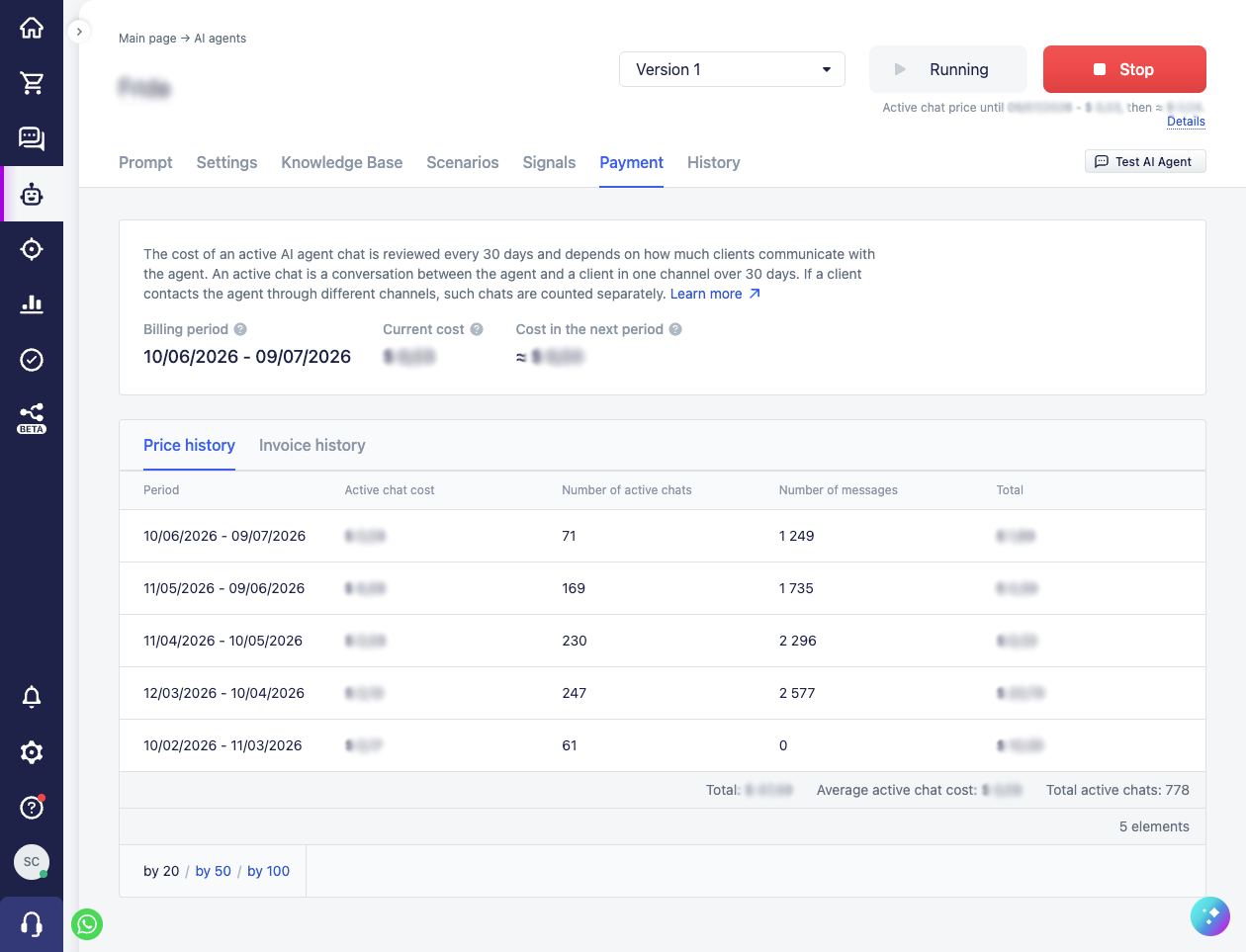
All the information is on the "Payment" tab in the agent card. At the top, the current "Billing period", the "Current cost" of an active chat, and the "Cost in the next period" (a forecast, with the ≈ sign) are shown. Below — two tabs:
- "Price history" — for each period: the cost of an active chat, the number of active chats, the number of messages, and the period total; at the bottom, a summary: the total, the average cost of an active chat, and the total active chats.
- "Invoice history" — by day: the invoice date, the number of active chats, their cost, and the charge amount (with a time filter).
All amounts are shown in your account's currency. A brief summary — the current cost of an active chat and the forecast for the next period — is also visible in the header of the agent card, on any tab. Invoices are generated automatically: once a day, the system invoices the active chats that have not yet been invoiced.
Agent freeze
The system pays the invoices for active chats automatically — it deducts the amount from the account's personal balance. If there are not enough funds on the balance at the moment of the charge, the agent is automatically frozen: it stops serving clients and remains in this state until the invoice is paid.
There is no need to unfreeze anything manually. It is enough to top up the balance — as soon as there are enough funds and the invoice is charged, the agent automatically returns to work.
Frequently asked questions
Why is the cost determined dynamically?
Agents are given very different tasks: one simply handles an incoming enquiry — determines the topic and language, hands the dialog to the right manager; another fully guides the client — answers from an extensive knowledge base, selects products in the catalog, and creates orders. The cost of work for such agents differs by several times, so a single fixed cost would be unfair: for a simple agent you would overpay, while a complex one would run at a loss. So the cost is calculated dynamically — it is tied to the real costs of your specific agent.
At the same time, the exact cost cannot be calculated in advance from the settings alone — it depends on how clients actually communicate with the agent: how many messages, how long the dialogs are, how often the agent turns to the knowledge base and the catalog. So the system measures the actual consumption over a period (that is what the trial period is for) and adjusts the cost to it.
And this is more of an advantage than a drawback. You only pay for the AI features that genuinely help solve your tasks in the chat with the client. And if the agent is not coping and its capabilities are not enough, they can still be strengthened — for example, by connecting a more powerful LLM model. Yes, the cost of an active chat will become somewhat higher, but in the end you get a working and useful tool, rather than an assistant that often makes mistakes.
Roughly how much will an agent cost?
The exact cost is specific to each agent, but from the experience of various agents, indicative ranges can be given — enough to estimate the budget even before development and testing. The cost of an active chat starts from one cent and grows along with the agent's capabilities:
| What kind of agent | Approximate active chat cost |
|---|---|
| Minimal — sends the client at least one reply or simply determines their intent at the start of the dialog | from $0.01 (minimum) |
| Simple — works mostly by the prompt instructions, with a few knowledge base documents, advises on typical questions | $0.02–0.03 |
| More complex — additionally selects products in the catalog | $0.05–0.07 |
| With a large knowledge base — answers from many documents | $0.10–0.12 |
The figures are heavily averaged: the real cost depends on exactly how clients communicate with the agent and which features it uses. To find out the cost of a specific agent, that is what the trial period and dynamic calculation are for. You launch a finished agent on real clients at a low fixed cost, and on the "Payment" tab, as real dialogs accumulate, a forecast of the active chat cost for the next period appears — by the end of the trial period it is already close to the actual one you will start paying.
A rough estimate can be obtained earlier too: run typical dialogs in the test chat — from them an indicative average active chat cost is estimated even before launching on real clients.
Can the agent be refined after the trial period, and how does it affect the cost?
Yes, the agent can be refined and changed at any time — after the trial period too, this is in no way limited.
Within one period the cost does not change. It is fixed for the whole period, whatever edits you make. This is done on purpose: the cost within a period stays predictable, and changes do not cause jumps in the middle of it.
Edits are reflected in the cost from the next period. When the period changes, the cost is recalculated and takes the changes into account: if the agent became more complex or more powerful (more prompts, steps, signals, and documents, a catalog connected, a more powerful model chosen) — an active chat becomes more expensive; if you simplified it — cheaper.
To assess the effect in advance, look at the forecast on the "Payment" tab. The edits themselves do not change the forecast yet — it is recalculated after the updated version has worked in the test chat or on real clients: it is from its real work that you can see how the changes will affect the cost in the next period.
If the same client writes on different channels, will I have to pay for them twice?
Yes. Each channel is a separate chat with its own conversation (WhatsApp, Instagram, Telegram, and so on), and for the system these are different interlocutors: the agent cannot assume that the person from WhatsApp and the person from Instagram are the same individual, and it handles each channel independently. So the same person writing to two channels creates two separate active chats.
It is important that this is "once per channel", not "per enquiry": within one channel, a client counts as one active chat per period, no matter how many messages and dialogs they have. Usually a client communicates on one channel, so in practice double payment for one person is more of an exception.
For example: a client wrote on WhatsApp on 1, 5, and 12 May — this is one active chat (one conversation on one channel over the period). If they additionally write on Instagram, that is already a separate active chat.
If only event-triggered steps work in the scenario and the agent itself does not start, do I pay for such chats?
No. You pay only for chats in which the agent actually worked. If, in the scenario, steps fire on an event — "Message from customer" or "Dialog assignment" — and perform actions without starting the agent itself, such a chat is not billed.
This happens when the agent needs to be raised only on certain phrases or conditions: until that happens and the agent has not engaged, no active chat arises and no charge is made.
What happens to billing if I stop the agent for a while?
You can stop the agent when it is not needed without worry: you pay for active chats, not for time. While the agent is stopped, it does not work, does not handle clients, and does not accrue active chats — so nothing is charged for the downtime. New periods are also not created during a stop.
What happens on restart depends on how long the agent was stopped:
- A short stop — within the current period (for example, for a few days). When you turn the agent back on, the same period simply continues, nothing changes.
- The old period ended while the agent was stopped. The switch to a new period is postponed until you turn the agent back on (it does not happen during downtime). On start, the old period is closed and a new one is opened:
- if you turn the agent on within one period (30 days) after the end of the old one, the new one runs right after it — the downtime days fall within it, but since there were no active chats in them, they cost nothing;
- if more than 30 days have passed since the end of the old period (that is, a whole period stood empty), the system does not breed empty periods for the downtime and starts a new period from the day you turned the agent back on.
The threshold is counted from the end date of the old period, not from the moment of stopping: the boundary is exactly one period (30 days) after its end.
In the process, the dynamic cost calculation simply continues from what the agent actually accumulated before the stop.
How are charges for active chats made — once or gradually?
It depends on which side you look at it from:
- For a single active chat — once. Each active chat in a period is billed exactly once, on the client's first contact with the agent. No matter how many messages and dialogs there are in it afterwards in this period, you will not be charged for it again.
- For the period as a whole — gradually. The invoice is not issued as a single amount at the end of the period. Once a day, the system adds the new active chats that have appeared since last time to the invoice — that is, payment goes in instalments over the course of the period, as the agent handles new clients.
A couple of clarifications: the current day's active chats go into the invoice the next day, and very small amounts in the current period may accumulate up to a noticeable invoice, so as not to breed micro-charges. When the period closes, the remaining active chats are invoiced in any case — nothing is lost.
Do I pay for chats where the agent made a mistake?
Yes. An active chat is billed for the fact that the agent worked in it — regardless of how well an individual reply turned out. You configure and test your agents yourself and bring them to live channels when you are confident in the stability of their work. Agents can make mistakes — this is the reality of AI work, and payment for handled active chats is not recalculated because of individual unsuccessful replies.
To minimise mistakes, you have free testing in the test chat and a trial period on real dialogs at your disposal: check the agent's behaviour before trusting it with live traffic, and refine the scenario, instructions, and conditions where it behaves unstably.