
Contents
- Role separation
- When signals are needed
- How a signal is created
- "Signal description" — the instruction the signal is filled in by
- Dependencies: a signal does not appear right away
- What a set signal affects
- What to pay attention to
- Practical patterns
Signals are background characteristics of the conversation that the signal system detects as the conversation goes on: the client's mood, the presence of a complaint, a demand to hand the dialog over to a manager, a repeated request for information. This happens unnoticed by the client and separately from the agent's main work: the signal system watches the characteristics of the conversation and sets their values, while the scenario reacts to the set signals — starts a step, uses the value in conditions, opens additional nested signals for analysis.
This way, a second, almost invisible layer appears on top of the main scenario: the agent's main work proceeds step by step, while the signal system quietly works alongside and watches the meaning of what is happening. The value is that the reaction to a signal can be handled at any point of the scenario and, depending on the situation, either change the direction of the agent's work or enrich its task with additional context.
Role separation
The signal mechanism rests on a separation of roles, and here it is important that the agent itself does not evaluate signals. Three independent parties take part:
- The signal system — observes. It works separately from the main agent: on every turn it looks at the conversation and sets the signal values by their descriptions ("is the client irritated?" → "client's mood" = "irritated"). It does not make "what to do about it" decisions — it only records the characteristics.
- The scenario — reacts. The scenario responds to the set signals: it starts a hidden step, checks the values in conditions, opens nested signals. This is an automatic reaction that you configure in advance.
- The agent — receives the result. The agent itself does not evaluate the characteristics and does not know about the transitions triggered by signals. It only sees the current signal values in the work dashboard and does what the scenario directed its work towards — the mixed-in instructions and the transitions between steps. This way it is not distracted by analysis and keeps its attention on the conversation with the client.
The point of this separation is that watching the signals is taken out of the main agent into a separate signal system. For it, this is a simple, isolated task — set values by the descriptions — without mixing it with the agent's reasoning about the reply to the client. That is why signals work reliably even in a long dialog: setting a single value by a clear instruction is much easier than keeping a complex rule throughout the whole conversation and applying it in time.
When signals are needed
Signals are useful when the agent's working rules depend on the meaning and context of the conversation with the client and can fire at an unpredictable moment. Use signals when:
- a rule is hard to move into sequential step-by-step work, or it has to be duplicated several times;
- a rule depends on several factors at once that can be moved out and observed through separate signals;
- a rule is needed rarely, but at the moment it is detected it requires critical measures;
- in a long dialog the agent regularly forgets or ignores the rule;
- the reaction to a signal can be used to change the agent's work strategy in any part of the scenario;
- to enrich the agent's context without changing the direction in the scenario.
And conversely, do not move into a signal what is easier to keep in the prompt or the step description: a general rule of behaviour or message formatting, prohibitions and work boundaries, other instructions that always apply and that the agent handles stably.
The difference between the types of instructions available to the agent is covered in detail in the Comparison of scenario instructions section.
How a signal is created
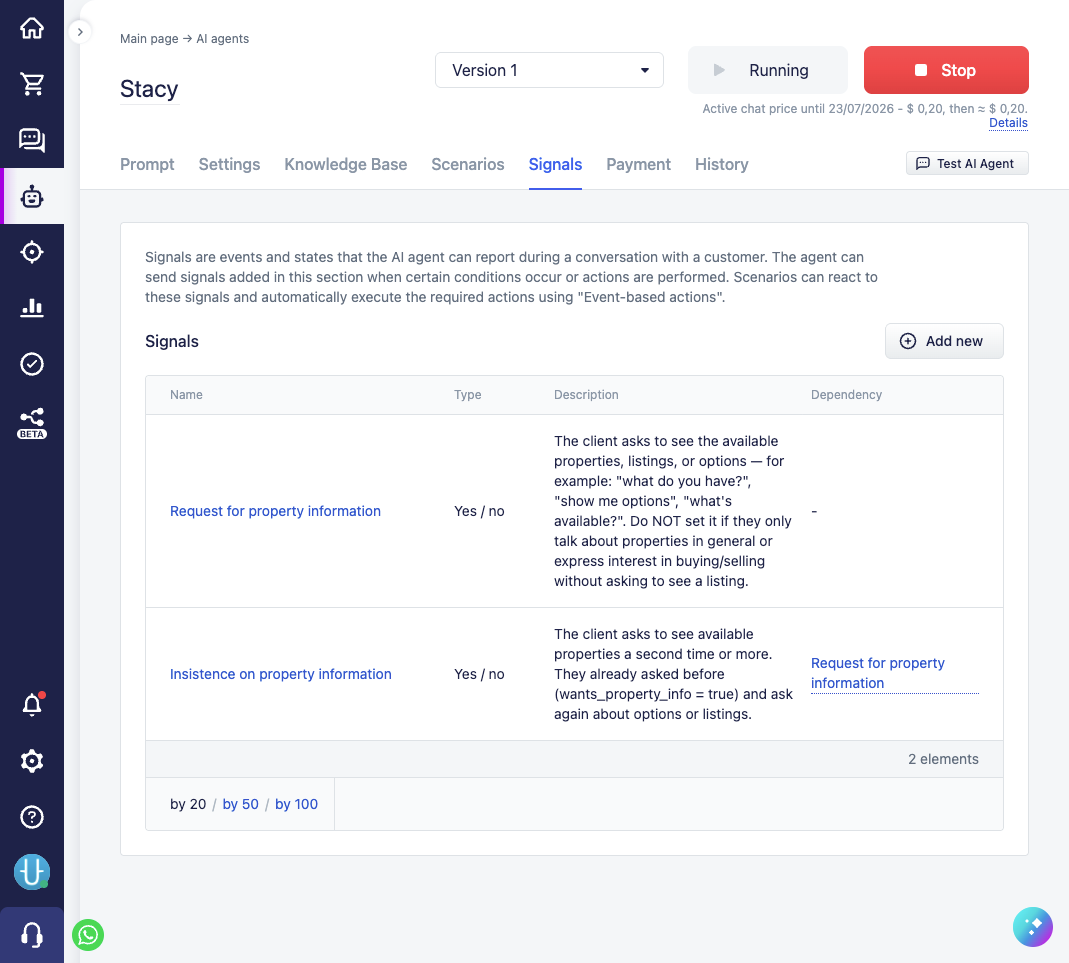
Signals are managed on the "Signals" tab in the agent settings: the list of all signals and the "Add new" button are shown. For each signal, the form defines:
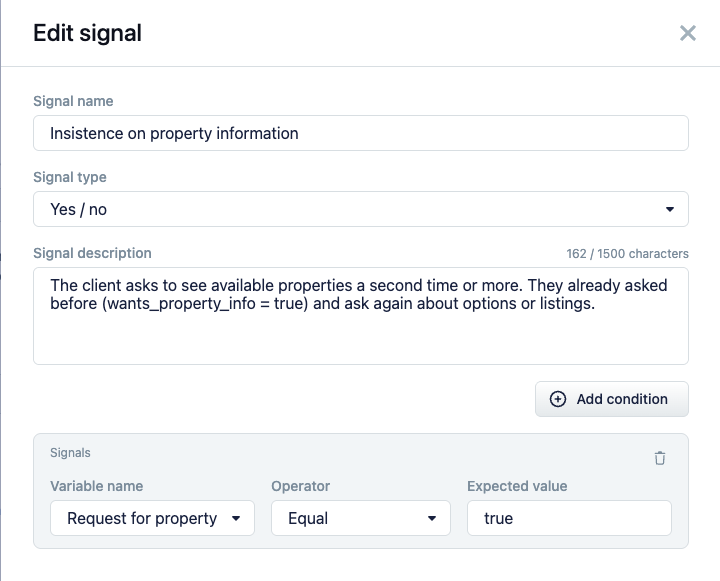
- "Signal name" — a concise and clear name. It is shown to the agent in the work dashboard once set, and is also used when composing conditions.
- "Signal type" — the value type: "Yes / no", "String", or "Number".
- "Signal description" — the instruction by which the signal system fills in the signal. This is the most important field: the more detailed and clear you describe when and how to set the value, the more accurately and stably the system will fill it in.
- "Dependencies" — the set of conditions whose fulfilment makes the signal come into play (see below).
The type determines what value the signal system sets when it detects the signal:
- "Yes / no" — a simple yes/no observation: "the client asked for a callback", "there is a complaint".
- "String" — a textual classification: lead type, reason for dissatisfaction. You need to describe predefined value options — the system chooses from a fixed list of categories (for example, mood: neutral / positive / irritated / angry). These options can then be used when configuring conditions by the set signals.
- "Number" — a numeric rating on a scale: urgency, readiness to buy from 0 to 10.
"Signal description" — the instruction the signal is filled in by
The "Signal description" is a direct instruction to the model, and the quality of the whole signal system's work depends on it. The same rule applies here as for the "Instruction for AI agent" in step data: the signal system fills in the signal by reading your description, and without a clear instruction it will make mistakes.
What to specify in the description:
- specific triggers — when exactly to set the value ("set
truewhen the client asks about the price for the second time or more"); - the meaning of each value, especially for "Yes / no": when
true, whenfalse, and when to leave it empty; - the boundaries — what should not be counted ("only if the client explicitly asks for a person; do not set it when they merely ask questions or express dissatisfaction");
- revising the value — whether the signal value needs to be changed or reset if the situation has changed;
- the edge cases where it is easy to make a mistake.
The language of the description is like that of other instructions to the model: write it in whichever language is more convenient for you to configure the system. It is an instruction for the agent, not text for the client.
Dependencies: a signal does not appear right away
By default, the signal system evaluates all active signals. "Dependencies" let you hide a signal until another signal (or another condition) gets the needed value — and bring it into play only then.
The opening happens gradually, because the signal system re-evaluates the signals on every new message from the client. On the first message, only the top signal is available to it; as soon as that one gets the needed value, the nested one opens — and from the next message the system evaluates it too.
For example, the task is not to lose a client who is interested but hesitant. The broad "the client is interested in buying" signal is always visible; while it has not fired, it is too early to dig deeper. As soon as the interest is confirmed, a narrower signal opens — it refines the picture and determines what exactly is stopping the client from deciding: too expensive, distrust, unsure about quality, wants to think it over. As soon as the reason is recognised, the scenario, by that signal, gives the agent the needed knowledge base document — for example, "Handling objections" — so that it studies the suitable arguments and helps the client dispel the doubt. In the list of signals, the "Dependency" column shows the signal after whose expected value the dependent one opens.
The dependency itself is a condition: you choose a signal ("Variable name"), an operator ("Operator", "Equal", and others), and an "Expected value". Several rules are combined by "and" (all are needed) or "or" (one is enough). Important: the dependency only decides whether the signal comes into play on this turn — it does not set the value itself. When the signal becomes available, its value is determined from the conversation.
The format of the conditions, the operators, and all available sources are common to the whole scenario and are described in detail in the Dependencies between signals section.
What a set signal affects
A set signal works in several places.
1. It starts a scenario step. A step configured for the "Reaction to signal" event (see Which events a step can be configured for) fires when the signal values match its "Step trigger conditions". The system runs such a step before the agent's usual reply. Inside, it can do everything an ordinary step can — add an instruction, go to another step, hand the dialog over to a manager, assign tags, save data.
A signal step can also have additional conditions from other sources — for example, launch the escalation only on a negative signal and only during working hours.
2. It takes part in conditions. The signal value is available in any scenario conditions (the "Signals" source): you can use it to choose a transition branch, skip or block an action, open a nested signal. For details, see the The Signals source section.
3. It is shown to the agent in the work dashboard. The system shows the agent the current signal values in the work dashboard on every turn. This way the agent has a stable context about the conversation between turns — it sees what has already been recognised (mood, lead type, discussed topics) and does not parse the whole history again.
One-time firing and reset
A signal step fires once per signal value — so that it does not start again on every message while the value holds. The logic is this:
- "mood" became "irritated" → the escalation step fired and is marked as fired;
- the next message, "mood" is still "irritated" → the step does not fire again;
- the client calmed down, the signal was reset to an empty value → the mark is removed;
- later the client is irritated again → the step can fire once more.
Resetting the signal to an empty value, therefore, not only clears the value but also removes the mark of the fired steps. This is used on purpose: in the signal description you specify when to reset it, so that the reaction can repeat in changed circumstances. For more details, see the Steps triggered by signals section.
What to pay attention to
- Signal values live for the whole dialog and are not cleared between messages. When the dialog is closed, they are reset, and the new dialog starts without the previously found signals (the lifecycle details are in the The Signals source section).
- The signal system fills in all the signals currently visible, so keep their number reasonable: dependencies help show only what makes sense at the current moment.
Practical patterns
Irritation escalation. The "client's mood" signal ("String" with the options neutral / positive / irritated / angry) is updated by the signal system on the fly. A hidden step on "Reaction to signal", on "irritated" or "angry", mixes in for the agent an instruction to switch to a gentle de-escalation mode or hands the dialog over to a manager.
Switching to a hidden scenario branch. In a scenario you can keep a separate branch, initially hidden from the agent by the step visibility toggles. When a special state is recognised in the conversation, a signal step opens the transition to that branch for the agent — and before that, the "Clear agent tasks" action resets the accumulated context and previous tasks. This way the agent does not drag along what it was working on before and switches completely to the new goal.
Counting repetitions through a chain of signals. It is hard for the agent to keep track of how many times the same thing was repeated over the conversation — for example, how many times the client asked a specific question or requested information. This is convenient to break down into a chain of linked signals: "requested information" → "requested again" → "insists on the request". Each next one depends on the previous and opens only after it, so the chain works as a repetition counter. What helps here is that the set of signals is re-evaluated on every new message: the next step becomes available only on one of the subsequent messages, so the repetitions are counted by the turns of the dialog. The chain can be set up for any specific request and, at the needed step, a reaction can be connected — for example, on "insists", hand the dialog over to a manager.
Reacting to the client's attachments. A signal can be configured for when the client sends an image or audio to the chat — for example, a photo of a document or a voice message. Such attachments often require manual processing that the agent cannot handle on its own, so by the signal the dialog goes to a manager.